


My Collection: Comic Scanner
3.3237.00 Reviews
App Specs
- Version
- 2.1.2
- Updated On
- License
- Free
- Downloads
- 100,000+
- Developer
- HipComic
- Categories
- Comics
- Platform
- Android, iOS
Screenshots

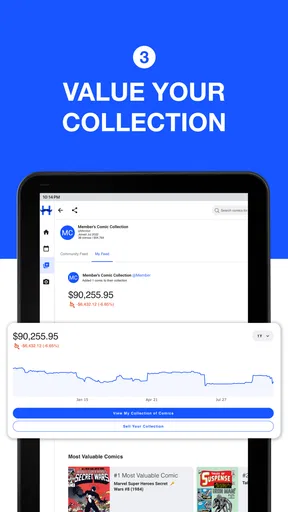

 Analysis by AppCompare
Ever found yourself staring at your ever-growing stack of comics and thought, "There has to be a better way to organize these?" Well, welcome to the world of My Collection: Comic Scanner. This app promises to be the ultimate tool for cataloging your cherished comic collection with the ease of a few taps on your phone.
Getting Started with My Collection: Comic Scanner
First things first, downloading My Collection: Comic Scanner is a breeze. Available on both Android and iOS, it’s just a quick click away from the app store. Once installed, the app greets you with a clean and user-friendly interface. Even if you’re not tech-savvy, navigating through the features feels as intuitive as flipping through your favorite comic book.
Scanning and Cataloging Made Easy
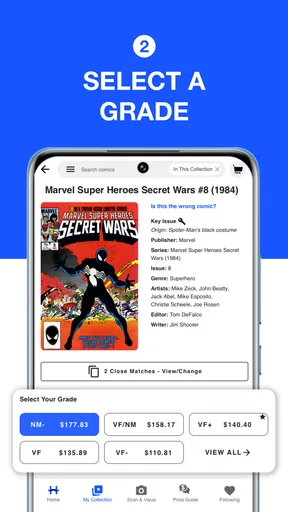
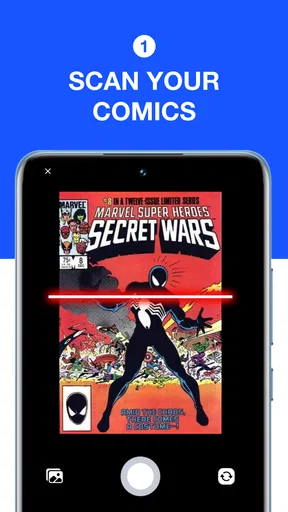
The core functionality of the app is its scanning feature, and let me tell you, it’s a game-changer. Using your phone’s camera, you can scan the barcode of any comic, and voilà, all the details you could possibly need are at your fingertips. This includes the title, issue number, publisher, and even a brief synopsis. It’s like having your own personal comic librarian right in your pocket.
But what if your comic doesn’t have a barcode? No worries! You can manually enter the details, and the app’s extensive database will still help you fill in the blanks. It’s this attention to detail that truly sets it apart.
Organize Your Collection
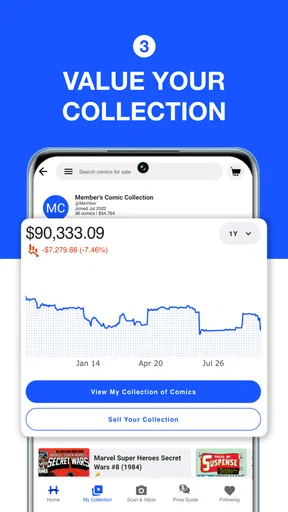
Once scanned, your comics are neatly organized in the app. You can sort them by series, publisher, or even your own custom categories. Whether you’re a hardcore Marvel fan, a DC devotee, or love diving into indie gems, organizing your collection becomes as satisfying as reading the comics themselves.
And if you’re the type who loves sharing your collection online, the app makes it super easy to showcase your prized comics on social media. Just a few taps, and you’re ready to brag about your latest finds.
Tracking Your Reading Progress
Now, here’s a feature I didn’t realize I needed until I had it—tracking your reading progress. Ever lost track of which issue you’re on in a lengthy series? The app allows you to mark issues as read, so you can easily pick up where you left off, no matter how long your hiatus might have been.
Worth Reading Before You Choose

EA SPORTS FC Mobile 26 Is a Bigger Football Game, but It Takes Time

Flipboard Shows What News Apps Must Do Beyond the Feed

Switching to Android Auto Means Rethinking Your Driving Routine

Google Calendar Makes a Crowded Week Easier to Manage

Ludo King Makes the Most of the Minutes Between Plans

Baby Panda World Brings Quick Play to Modern Phones, but Its Game Library Feels Busy
It even lets you set reminders for upcoming releases. Imagine getting a notification for the next issue of your favorite series right on your phone. It’s like having a comic shop owner who never forgets.
Backup and Sync
One of the biggest fears for any collector is losing their collection data. But fear not! With My Collection: Comic Scanner, you can back up your data to the cloud. This means your collection is safe and sound, even if you switch phones. Plus, syncing between devices is seamless, so you can access your collection whether you’re on your phone or tablet.
Room for Improvement?
As much as I love the app, nothing is perfect. One area I'd love to see improved is the customization of the app’s appearance. While functional, it would be great to add a touch of personal flair with themes or color schemes. Also, while the database is vast, some less mainstream titles might require manual input. However, the community and developers are quite active, so updates and improvements keep rolling in.
In conclusion, My Collection: Comic Scanner is a must-have for any comic enthusiast. It takes the hassle out of organizing and enjoying your collection while offering features that enhance your comic-reading experience. Whether you’re a seasoned collector or just starting, this app will make your comic collection journey more enjoyable.
So, if you're ready to bring order to your comic chaos, give My Collection: Comic Scanner a try. It might just become your new favorite app.
Pros
- Easy-to-use interface for quick scanning.
- Supports a wide range of comic formats.
- High-quality image output for clarity.
- Simple organization features for collections.
- Regular updates with new features.
Cons
- Limited cloud storage options.
- Occasional glitches with large files.
- No in-app editing tools for images.
- Subscription required for premium features.
- Lacks community sharing options.
FAQs for My Collection: Comic Scanner
What features does My Collection: Comic Scanner offer?
My Collection: Comic Scanner provides a comprehensive way to catalog and manage your comic book collection. The app includes features such as barcode scanning for quick entry, detailed comic information, cloud backup, and the ability to track missing issues. It also allows users to access their collection offline, making it convenient for on-the-go reference.
Is My Collection: Comic Scanner available on both Android and iOS?
Yes, My Collection: Comic Scanner is available for download on both Android and iOS platforms. Users can find the app on the Google Play Store and Apple App Store, ensuring it is accessible to a wide audience regardless of their device preference.
Does My Collection: Comic Scanner support multiple languages?
Currently, My Collection: Comic Scanner primarily supports English. However, the developers are working on adding more languages to cater to a broader audience. Users are encouraged to check for updates to see if their preferred language has been included in future versions.
Is there a cost associated with downloading or using My Collection: Comic Scanner?
My Collection: Comic Scanner offers a free version with basic features. However, for users looking for advanced functionalities, such as additional storage or customization options, there is a premium subscription available. Pricing details can be found within the app or on its respective download page.
How does the barcode scanning feature work in My Collection: Comic Scanner?
The barcode scanning feature in My Collection: Comic Scanner allows users to quickly add comics to their collection by scanning the barcode on the cover. The app then retrieves detailed information about the comic, such as title, issue number, and publication date, streamlining the data entry process and ensuring accuracy.


